Appearance

The templates include configuration files to simplify deployment of applications. Those are further explained below.
All templates include a simple Dockerfile to build Docker images. The following base images are used:
backend and eai): RedHat UBI OpenJDK Runtimefrontend and webcomponent): RedHat UBI Nginx (e.g. ubi10/nginx-126)Important
To ensure broad hardware compatibility of built container images, it is strongly recommended to use a multi-architecture base image whenever possible. In such cases, an architecture-agnostic SHA should be used. Depending on the image source, the correct SHA can be found for:
By default, applications based on the RefArch Templates are built for AMD64 and ARM64 hardware architectures.
Helm allows easy deployment of multi-container applications to a Kubernetes cluster using charts.
For RefArch-based applications, there are multiple ways to use Helm charts with increasing customizability and manual effort.
refarch-templates chart (recommended) The reference architecture provides a Helm chart to easily deploy RefArch-based multi-container applications by just providing a configuration file (values.yaml). Each application container is called a "module" in the refarch-templates chart. Additionally, a RefArch API Gateway can be deployed as well. An example values.yaml file can be found in the Helm chart sources.
Splitting into multiple files (e.g a common values.yaml and environment specific configuration in values-<ENV>.yaml) is also possible.
Warning
When using multiple files, array-based configuration options are not merged.
The release notes of this chart can be found in the GitHub releases of the it@M Helm Charts repository.
Information
Detailed information about all configuration options for the refarch-templates Helm chart can be found in its README. Available options for the RefArch Gateway can be found in the configuration documentation.
The configuration file (or multiple) can then be used to install the chart to your cluster with the following commands:
helm repo add it-at-m https://it-at-m.github.io/helm-charts
helm install <HELM_RELEASE_NAME> it-at-m/refarch-templates --version <HELM_CHART_VERSION> --values values.yaml --values values-<ENV>.yamlAn internal IaC example repository is provided, which implements this variant.
refarch-templates chart as dependency for an application-specific chart The refarch-templates chart can be used as a dependency for application-specific charts through Helm dependencies. This allows reuse of the mechanisms provided by the refarch-templates chart, while the application-specific chart can be further enhanced with custom configurations and Kubernetes resources.
A simple Chart.yaml could look like this:
apiVersion: v2
name: myapp-chart
description: Helm Chart for deploying my app using refarch-templates as dependency.
type: application
version: 1.0.0 # Version of your own Helm chart
dependencies:
  - name: refarch-templates
    version: 1.0.0 # Version of refarch-templates chart to use
    repository: "@it-at-m"
Information
More information about creating Helm charts can be found in the official Helm documentation.
Creating a custom Helm chart allows for the manual definition of all required Kubernetes resources. This approach provides complete control over the configuration but requires a high level of effort.
Important
Using this variant is not recommended. It is advisable to explore variants 1 or 2 first. If any features are found to be lacking, an issue can be opened in the it@M Helm Charts repository.
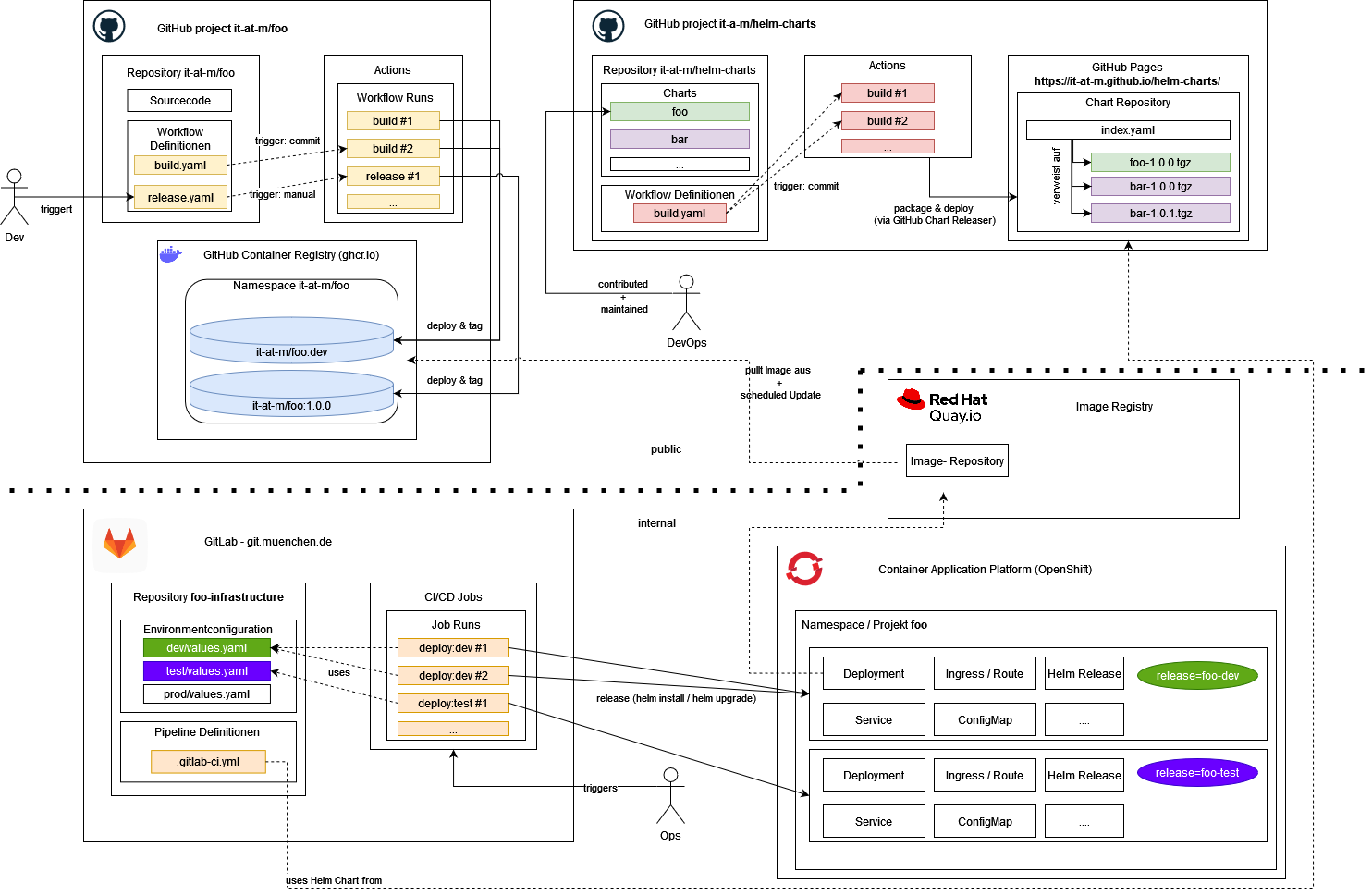 The diagram shows an step by step overview of how applications are delivered at it@M/LHM, from code changes to deployment in environments:
it-at-m/foo: Add code changes, compile and build code and imagesit-at-m/helm-charts: Provide helm charts for project deploymentQuay: Internal image registry as pull through cache for the project imagesgit.muenchen.de: Internal Git repository to run deployment pipelinesContainer Application Platform: Internal kubernetes plattform to run applicationsFurther details are described in the following chapters.
An automatic rollout is implemented, through an image stream that links to the internal image registry (Quay). The deployment includes a special annotation that prompts the internal Kubernetes platform (OpenShift) to automatically trigger a new rollout when a new image becomes available. For more details, see this documentation.
For other environments (stage, prod), a manual rollout is implemented. The image version must be specified for each service in the Helm configuration file values.yml.